Ratatype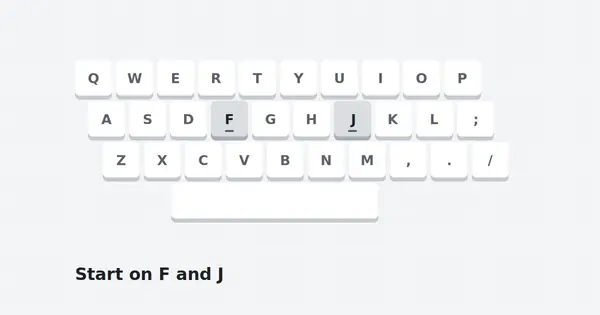
How to start touch typing with Ratatype
Your first week with a typing tutor decides whether the habit sticks. Here is a calm, realistic way to begin.
Read full guideRatatype is a free online touch typing tutor that teaches you to type with ten fingers, eyes on the screen. Here you will find how the Ratatype lessons work, how to pass the typing test, and how to build real speed, and you can practise right here with our built-in typing test and lessons.

Practise right here, no sign-up and nothing to install. Take a timed typing test or pick a lesson, follow the highlighted key on the keyboard, and see your WPM and accuracy live.
Click or tap here to start typing
A typing tutor that teaches your fingers where the keys are, so your eyes never have to look.
Ratatype is an online touch typing tutor. Instead of hunting for keys with two fingers, you learn to rest your hands on the home row and reach every key with the correct finger. After enough repetition your hands remember the keyboard on their own, and you type while reading the screen.
The Ratatype course is built from short lessons. Each one introduces a small group of keys and asks you to type exercises until your speed and accuracy reach a target. You can take a typing test at any time to measure words per minute and accuracy, and a good result can become a typing certificate.
Because Ratatype runs in the browser, it works on any computer with an internet connection, and it supports many keyboard layouts and languages. It is used by students learning keyboard skills for the first time, by professionals who want to stop looking down, and by teachers running typing classes.
Ratatype.org is an independent companion to the tutor. We explain each part of the Ratatype course in plain language, share practice plans, and give you a built-in typing tool to practise with.
Every tool in Ratatype exists for one reason: to turn slow, look-down typing into fast, confident touch typing. These are the parts you will use most.
Short lessons introduce a few keys at a time, so your fingers learn each path before the next one is added.
A quick test measures your words per minute and accuracy, so you can see real progress week by week.
Turn a good test result into a certificate you can share with an employer or add to your CV.
Practise on the layout you actually use, with support for more than ten keyboard layouts and languages.
Compete with friends in groups, or create a class to teach and follow a whole room of students.
A typing game gives you a lighter way to practise when drills feel repetitive.
The path is the same for almost everyone. It is short to describe and takes a few weeks of steady, daily practice to complete.
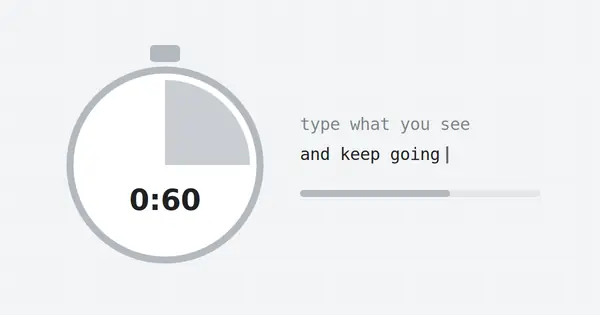
Take a short typing test with your current method. Note the result and move on; it is only a starting point.
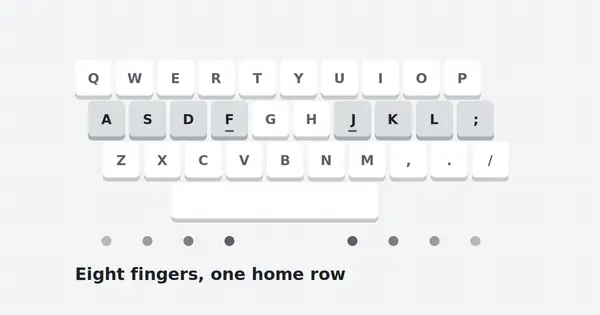
Rest your fingers on A S D F and J K L ;, find the bumps on F and J, and work through the first lessons slowly.
Each lesson adds new reaches to the top and bottom rows. Stay on a lesson until your accuracy is high.
With every key learned, work on rhythm and speed, test weekly, and earn a certificate when you are ready.
The first week is the hardest part of learning with Ratatype. Your old two-finger habit is still faster, and switching to all ten fingers feels like going backwards. That dip is normal and it is temporary. Most learners pass their old speed somewhere in the second or third week, and from that point every session adds speed instead of taking it away.
What makes the difference is consistency. Ratatype lessons are short on purpose, so you can fit one into a break or before work. A daily twenty-minute session builds muscle memory far better than a long session once a week, because your hands consolidate new movements while you rest between sessions. Keep your eyes on the screen, trust the bumps on F and J, and let the lessons do the rest.
Lessons move outward from the home row, one region of the keyboard at a time. Each stage below builds on the one before it, which is why skipping ahead rarely helps.
The eight resting keys and the space bar. The foundation for everything that follows.
Reaching up to Q W E R T and Y U I O P, then returning to home each time.
Reaching down to Z X C V B and N M, plus comma and full stop.
Using the opposite Shift key, punctuation and common symbols.
The number row and full passages that bring every key together.
Words per minute, or WPM, is the number Ratatype reports after a test. A word is counted as five characters, including spaces. Use this table to see where you stand and what the next level looks like.
| Level | WPM | What it feels like | Range |
|---|---|---|---|
| Beginner | Under 20 | Still searching for keys; focus on the home row. | |
| Learning | 20 to 35 | Touch typing works but feels slow. Keep accuracy high. | |
| Everyday | 35 to 50 | Comfortable for email, study and daily writing. | |
| Professional | 50 to 70 | Strong for office, support and admin work. | |
| Advanced | 70 to 90 | Fast and steady; ideal for writing-heavy roles. | |
| Expert | 90+ | Rare. Usually years of focused practice. |
Accuracy matters as much as speed. Aim to keep it above 95% at every level, because every mistake costs extra keystrokes to correct.
To put the numbers in context: a typical one-page email of about 250 words takes more than twelve minutes at 20 WPM and around five minutes at 50 WPM. Over a working week, moving up just one level in the table can give you back hours of time. That is why the Ratatype typing test is worth taking regularly. It turns a vague feeling of getting faster into a number you can track, and it shows clearly when it is time to focus on accuracy instead of pace.
Anyone who types more than a few lines a day gains time from touch typing. Three groups benefit most.
Essays, notes and online exams all go faster when your eyes stay on the screen. Learning young means the habit lasts for life, and a certificate looks good on applications.
Emails, reports, chat and code add up to hours of typing each week. Even a modest gain of 15 WPM saves real time, and touch typing reduces the neck strain of constantly looking down.
Classes and groups make it simple to set lessons, follow each student and celebrate progress. Our guide for teachers includes a ready weekly structure for school use.
Twenty minutes is enough. Split it like this and you will cover warm-up, new keys, accuracy and a quick check every day.
Warm up on home row drills with relaxed hands.
Work on your current Ratatype lesson until the target is met.
Drill your three weakest keys with short repeats.
Type a short passage and note how it felt.
Step-by-step articles on every part of learning to type, from your first lesson to earning a certificate.
Your first week with a typing tutor decides whether the habit sticks. Here is a calm, realistic way to begin.
Read full guideEvery fast typist relies on the same eight resting points. Learn them once and every lesson gets easier.
Read full guideA typing test is a snapshot, not a verdict. Here is how to get a result that shows your true level.
Read full guideQuick answers to what people ask most about Ratatype and touch typing.
Ratatype is a free online touch typing tutor. It teaches you to type with all ten fingers without looking at the keyboard, using step-by-step lessons, a timed typing test and practice exercises that track your speed and accuracy.
Yes. The core lessons, the typing test and practice tools are free. You can start without registering, and creating an account lets you save progress and earn a certificate.
No. Ratatype runs in your web browser, so there is nothing to install. You can practise right on this page: our built-in typing test and lessons work in any browser on a computer, tablet or phone.
Ratatype works on mobile devices and tablets. For learning real touch typing, a physical keyboard is still best, because the finger positions you train are the ones you will use at work or school.
With 15 to 20 minutes of daily practice, most people can type by touch within two to four weeks. Reaching a comfortable working speed usually takes one to three months, depending on how consistent you are.
Around 40 words per minute with high accuracy is a solid everyday level. 50 to 60 WPM is strong for office work, and 70 WPM or more stands out for typing-heavy jobs. Accuracy should stay above about 95%.
Ratatype supports more than ten layouts and languages, including English QWERTY and several European layouts. Choose the layout that matches your physical keyboard before you start.
Yes. Ratatype offers a certificate based on your typing test result. It shows your speed and accuracy and can be added to a CV or job application.
Yes. Teachers can create classes, add students and follow each student's lesson progress and test results, which makes it practical for school computer lessons.
No. Ratatype.org is an independent guide and resource site. We explain how to get the most from the Ratatype tutor and offer free practice materials, but we are not affiliated with Ratatype.com.